Showing posts with label PhotoShop. Show all posts

Wednesday, February 02, 2011

I Especially Heart Black Cats...

February’s Sketchbook Challenge is “Opposites.” I knew right away that I wanted to try making a cut paper collage using the Japanese positive and negative design concept of Notan. This was so much fun – kinda like cutting out Valentine hearts as a kid. For this simple, symmetrical design, I used a 3½“ piece of black paper folded in half diagonally, then cut the cat and heart shapes on one side. It’s amazing how much space a 3½” square takes up when all the cutout pieces are glued into their correct positions. And it’s interesting to see the design that’s revealed by the negative space. The second image is the design repeated and flipped in Photoshop. I think it has an Art Nouveau look to it. I will definitely be revisiting this process.


Monday, September 13, 2010

Messin' with Photoshop..

I found a beautifully coloured single-lobed sassafras leaf on the ground this afternoon, scanned it with a piece of decorative paper and applied the poster edges filter. Be sure to click to enlarge to see the details.

Sunday, January 18, 2009

Fun with Photoshop & Dolls...

This is one of my Vivette dolls (similar in size to Barbie) on her way to meet friends at a posh restaurant in London. She is wearing a snazzy outfit by DAE (the company that created Vivette). The free background is courtesy of bigfoto.com. As I’ve said before, I’m very easily entertained…

Saturday, March 15, 2008

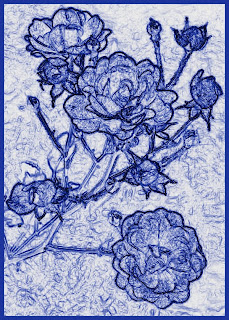
Roses Blue...

I was playing around in PhotoShop with a photograph of some roses from last year’s garden and this effect reminded me of flow blue china. First, I used the “Find Edges” filter; then, "Image/ Adjustments/ Invert." Next, I used "Image/ Adjustments/ Gradient Map," where I chose the third pattern under "Special Effects."